iPhone & Mac · 100% on-device

Your camera roll is a to-do list you never read.

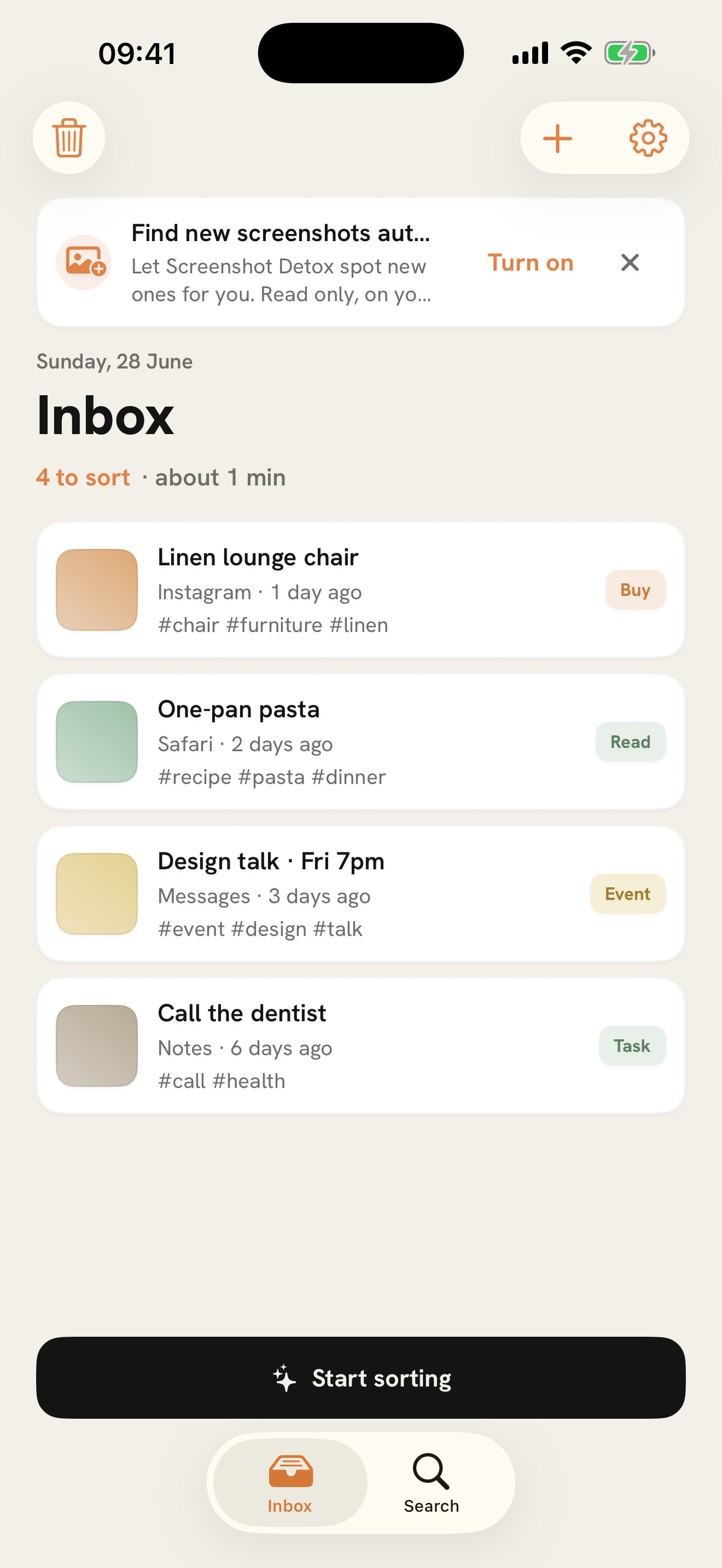
Screenshot Detox turns the pile into an inbox you can actually empty. Read each one on your device, then decide — keep, act, file, or let go.

No account. No cloud. Nothing leaves your device.

Screenshot Detox inbox on iPhone showing screenshots sorted into a calm list with a Start sorting button.

How it works

Three calm moves to inbox zero.

01 — CAPTURE

It reads every screenshot.

Import your library or share from any app. On-device intelligence reads the text — and the picture — so a meme isn't mistaken for an event.

02 — DECIDE

One screenshot, one tap.

Each gets a quiet suggestion: task, read, buy, event, receipt, reference, or dismiss. You always have the final say. One tap to undo.

03 — EMPTY

Bring the pile to zero.

Send an event to Calendar, a task to Reminders, a receipt to your records. Triage isn't a dead end — it ends in something done.

Triage card on iPhone — a screenshot with six decision buttons and a swipe hint.

Decide, don't hoard

Swipe to decide. Reach zero.

Every other app says “save it for later.” Later never comes. Screenshot Detox is built for the opposite: decide now, and empty the queue.

  • Swipe right to accept the suggestion, left to dismiss.
  • A quiet AI whisper — never a loud robot badge.
  • Recently Deleted is a safety net. Nothing is lost in one tap.
Search on iPhone finding saved screenshots by the words inside the image.

Find anything

Search by what's inside the image.

The text in your screenshots is read on-device, so you can find “invoice,” “that chair,” or “recipe” — not just the date you took it.

  • Full-text search across titles, captions, and recognized text.
  • Filter by type — receipts, events, shopping, and more.
  • Receipts even read their own total and merchant.

Private by design

Nothing leaves your device. Ever.

On-device intelligence

Text is recognized with Apple's frameworks, right on your iPhone or Mac. No server sees your screen.

No account, no cloud

There's no sign-up, no backend, no sync to opt out of. It just works, offline.

Nothing collected

No analytics, no tracking, no data leaving the device. “Data Not Collected” — and we mean it.

Screenshot Detox native Mac app with a three-column inbox.

Made for the Mac, too

A home for everyone who collects references all day.

A native Mac app with keyboard-first triage. Designers, researchers, and makers, this one's for you.

  • Watch multiple folders — new screenshots import themselves.
  • Clear a backlog of flagged junk in one pass with bulk review.
  • Decide with the keyboard: press 1–6, Return to accept, ⌘Z to undo.
  • Glance at your inbox from the menu bar, then get back to work.

Everything in the box

Quietly capable. Never noisy.

On-device OCR

Reads the text inside every screenshot in English and Portuguese — no connection needed.

Smart suggestions

Apple Intelligence (with a fast on-device fallback) suggests what each screenshot is for.

Calendar & Reminders

Turn an event into a calendar entry, a task into a reminder — straight from a screenshot.

Receipt fields

Pulls the total and merchant out of a receipt automatically, on your device.

Share & widget

Send links and images in from any app, and glance at what's waiting from the Home Screen.

Recently Deleted

A safety net for every decision. Restore anything you didn't mean to let go.

Coming soon

Stop hoarding screenshots you'll never open again.

Decide now, and empty the queue. Screenshot Detox is launching on the App Store for iPhone and Mac.